
Browse docs
Help translate Orfeo
Orfeo is free, made by one musician, and used by pianists around the world. Many of them would rather learn in their own language, and you can help make that happen.
You don’t need to be a programmer or a professional translator. If you play music and know your language, you’re exactly who we’re looking for. Translate ten texts or a thousand: every one helps, and you can stop whenever you like.

Deutsch

Français

Español

Português

Polski

简体中文
What is Weblate?
Weblate is a website where people translate free software together. Everything happens in your browser, so there’s nothing to install. Orfeo’s English texts appear one by one, and you type your translation underneath.
How to start
- Click one of the language tags above or open Orfeo on Weblate.
- Sign in, or create a free account.
- Choose your language. If it isn’t listed, choose Operations › Start new translation.
- Click Translate.
- Type your translation and click Save and continue.
Not sure about a text? Click Suggest instead, and someone else can check it.
A few simple rules
- All strings are machine-translated (DeepL) in advance for your convenience and have “Needs Editing” status. This means that a human translator must approve each string. Use Automatic suggestions tab to see the existing translations. Edit the translation and click Save and continue. Click Suggest for someone else to take over or Skip to move on withot changes.
- Keep placeholders as they are.
{{v0}}and{{v1}}become a number or a name when Orfeo runs. You can move them within the sentence. - Keep it short. Buttons and labels have little room.
- Leave these in English: Orfeo, GM, Studio, Native, MIDI and SoundFont.
- Leave chord symbols and note names alone. Orfeo handles those itself.
- Use the words musicians use. The word from your own lessons or rehearsals beats a literal translation.
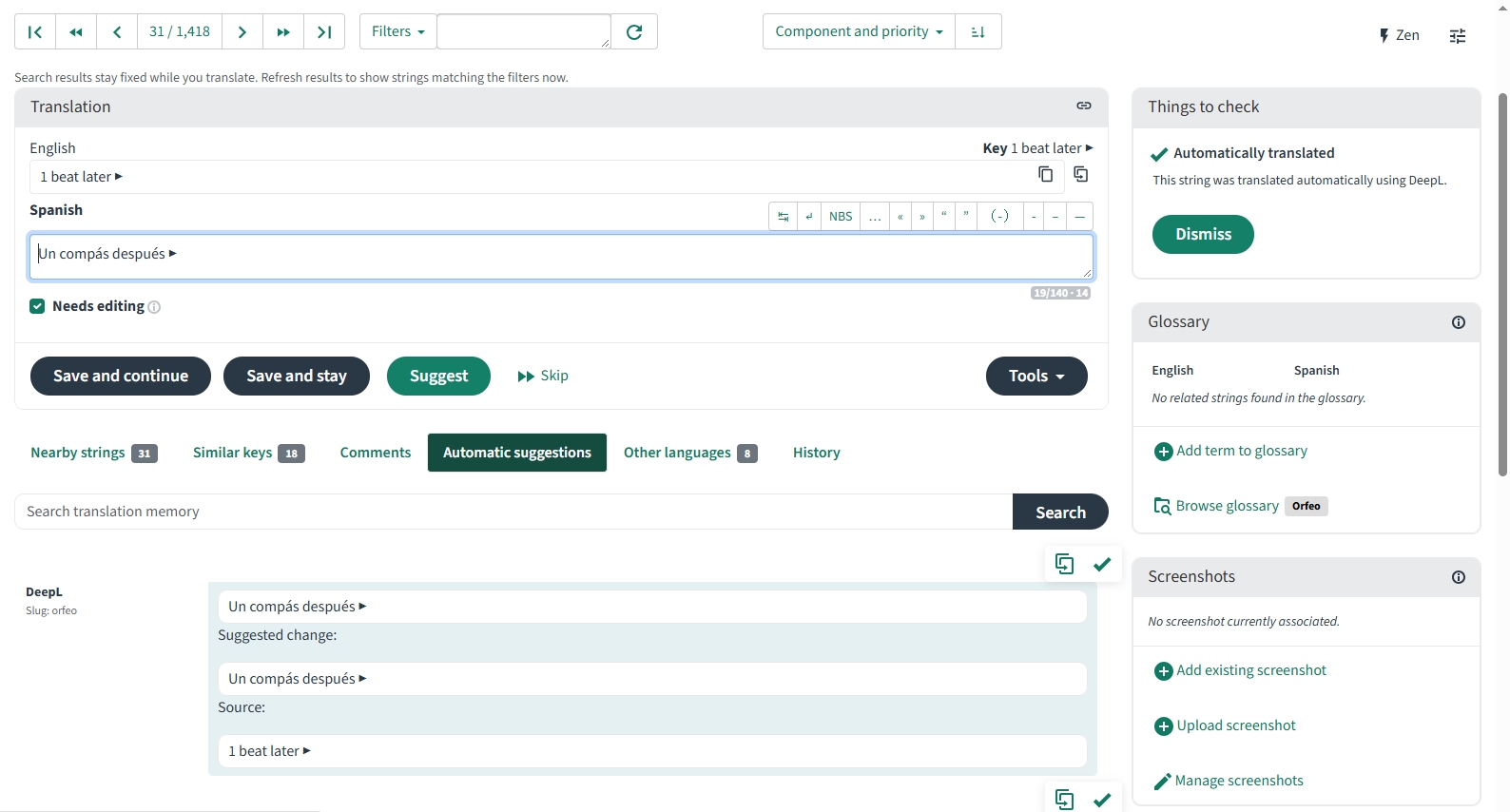
Weblate warns you if a placeholder goes missing, and shows how similar texts were translated, so you can stay consistent.
Some texts have a short note for context explaining where they appear. If a text is unclear, read the note first.
What happens next
All texts already have a draft waiting for a native speaker to check, so that’s the fastest way to help: correct what’s wrong and click Save. Every other language is welcome too.
Your translations are saved on Weblate. Orfeo’s language menu arrives in version 1.8, and texts that aren’t translated yet simply stay in English. New texts appear on Weblate as Orfeo grows, so there’s always a little more to do if you’d like to stay involved.
Questions?
Ask in the Orfeo community, or use the comments beside each text on Weblate.
Thank you for helping more musicians feel at home in Orfeo!